


Meeting rooms have changed considerably as workplaces have become more distributed. A room that once needed little more than a table, display, and conference phone may now need to accommodate employees sitting around the table, people joining from home, and teams moving between different collaboration platforms and locations.
Artificial intelligence is adding another dimension to that environment. Today’s meeting room systems can use AI to improve how participants are seen and heard, while collaboration platforms are adding tools that can capture conversations, summarize discussions, and identify follow-up tasks. For organizations already reconsidering their meeting spaces, these capabilities can be appealing, but they can also make an already complicated technology environment more complicated, and that distinction matters.
AI is Changing More Than the Meeting Itself
AI is entering the conference room at multiple points across the technology stack, shaping the experience before, during, and after a meeting through smarter cameras, audio processing, collaboration tools, and room analytics.
Goodbye, Static Shots and Stalled Video
Within the room itself, intelligent cameras and microphone systems can use real-time processing to improve framing, speaker visibility, voice pickup, and background-noise reduction, directly changing how participants experience a meeting.
The Meeting that Keeps Working After It Ends
Collaboration platforms can extend the meeting beyond the room with tools for transcription, summaries, recaps, and action-item identification. Microsoft Teams and Zoom, for example, can turn conversations into searchable records that capture key discussions and follow-up tasks. Room analytics serve a separate purpose, giving facilities and workplace teams data on space utilization and system performance.
When the Dashboard Needs a Human
There is also an operational side to the technology. Room analytics can provide information about utilization, occupancy, and system performance. That information may help an organization make decisions about meeting spaces, but the presence of a dashboard does not automatically make those decisions better. Someone still has to determine what the data means and what should change as a result.
More technology also means more to configure, manage, and maintain. An impressive feature list does not say much about how well the room will function once employees actually have to use it, and adding capabilities without considering the systems around them can create more complexity than value.
Let’s dive into this further.
Hybrid Meetings are One of the Clearest Use Cases
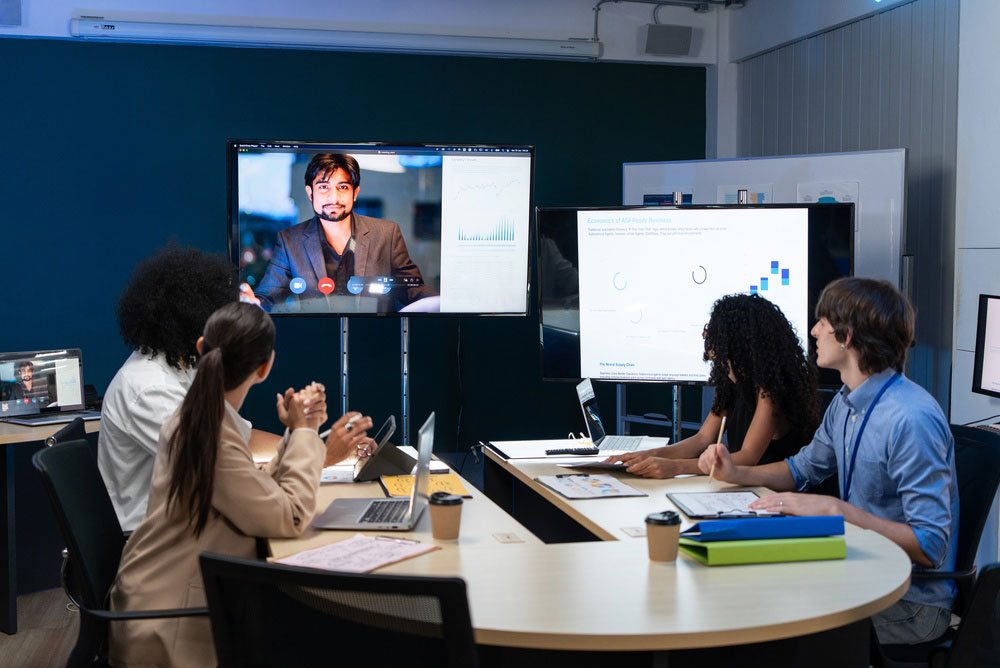
The growth of hybrid work has exposed one of the longstanding weaknesses of conference rooms: they were designed primarily for the people sitting inside them. A conventional camera can capture everyone at the table, but that does not necessarily create a good experience for someone joining remotely. A participant may have difficulty determining who is speaking, seeing people clearly, or following a conversation when several people are gathered around a large table.
AI-powered camera systems can address some of those problems through intelligent framing, speaker tracking, and multi-camera views. Instead of relying on one set image of the room, the system can adjust what remote participants see based on what is happening in the conversation.
Remember, the physical room still plays a major role. Camera placement, lighting, furniture, acoustics, and room size all influence how well these systems perform. A more advanced camera cannot compensate for every problem created by poor room design.
The Audio Still Needs to Work
A clear video feed does little to improve a meeting if remote participants cannot hear the conversation clearly. Intelligent microphone systems can improve voice pickup, reduce background noise, and manage interference that can make conference room audio difficult to follow. These capabilities can be particularly useful in larger spaces or rooms with challenging acoustics.
AI-based audio processing still depends on the physical and technical characteristics of the room. Microphone placement, acoustic treatment, digital signal processing, speaker placement, and system configuration all affect how well the system performs.
Accessibility is Already Designed into the Space
AI can also make meeting rooms more responsive to different accessibility requirements. When participants have voluntarily provided the necessary information and appropriate controls are in place, room systems could automatically prepare live captions, translated speech, higher-contrast displays, hearing assistance, or other accommodations. Cameras and displays could also be configured to support sign-language interpretation or provide synchronized content to a participant’s personal device.
Real-time translation can further reduce language barriers by allowing participants to communicate in preferred languages while maintaining a record of the conversation. The important consideration is how these capabilities are implemented because accessibility information can be sensitive personal data, so organizations need clear consent practices, appropriate access controls, and policies governing how that information is stored and used.
The Room will Prepare Itself
When incorporating AI, the meeting experience can begin before anyone enters the room. Calendar data, room-booking systems, workplace platforms, and building controls can provide the context needed to prepare a space. A presentation, training session, executive discussion, and collaborative workshop may each require different room configurations.
Predefined profiles can already automate tasks such as configuring displays, selecting cameras, testing microphones, adjusting lighting, and activating collaboration tools. As AI becomes more contextual, those configurations can respond more dynamically to the meeting. A workshop could activate interactive displays, while a meeting with sensitive information could apply specific recording or information-handling settings.
The same intelligence can help manage problems when equipment fails. Instead of simply reporting a disconnected microphone or camera, an AI-enabled system could evaluate whether the remaining equipment can support the scheduled meeting and reconfigure the room when possible. If the issue cannot be resolved, the system could identify another suitable room and notify participants.
Meeting Intelligence Extends the Value Beyond the Room
Meeting intelligence tools can turn a conversation into a searchable record, giving employees access to transcripts, summaries, and identified action items. Teams can revisit earlier discussions when a decision needs clarification or someone who joined late can catch up without requiring another employee to reconstruct the conversation.
The technology can also make follow-up more structured. Instead of leaving employees with a transcript and asking them to determine what matters, meeting systems can identify tasks, participants, decisions, and other relevant information.
The next step is connecting that information to the systems where work actually happens. Meeting outputs could feed approved productivity, project-management, CRM, or workflow applications so that decisions and assigned tasks do not remain trapped inside a meeting transcript.
There are very important limitations and risks when it comes to this. Transcripts and summaries can contain sensitive business information, and AI-generated records can contain errors or miss context. Access controls, retention policies, licensing, human review, and organizational governance all matter when meeting content becomes part of the business’s information environment.
When Does an Upgrade Become too Much Technology?
The challenge with workplace technology is determining whether employees will actually benefit from it or will it add more complications.
An organization could install advanced cameras, intelligent microphones, meeting analytics, automated controls, and AI-powered collaboration tools and still end up with a frustrating meeting room if those systems do not work together.
The difference becomes easier to see when the technology is evaluated based on the problem it solves.
Capability: AI Video Framing
Value Upgrade – When It Works: Multi-camera systems provide remote participants with clear views of in-room speakers and help them follow the conversation.
Extra Tech Layer – When It Fails: Over-engineered camera switching feels distracting, loses context, or performs poorly because of calibration or room conditions.
Capability: Automated Notes
Value Upgrade – When It Works: Transcription, searchable summaries, and action items create a useful record of the meeting.
Extra Tech Layer – When It Fails: Inaccurate transcripts and unedited recaps create additional work or introduce privacy and information-management concerns.
Capability: IT Diagnostics
Value Upgrade – When It Works: Monitoring identifies problems early and helps resolve them before they disrupt a meeting.
Extra Tech Layer – When It Fails: Excessive alerts create another dashboard for IT to monitor without addressing underlying infrastructure problems.
Smart Scheduling
Value Upgrade – When It Works: Utilization data and room recommendations help organizations use space more effectively.
Extra Tech Layer – When It Fails: Restrictive booking rules frustrate employees or make spontaneous collaboration more difficult.
An upgrade should reduce friction somewhere in the employee or IT experience. It might make hybrid participation easier, reduce setup time, improve accessibility, simplify follow-up, or reduce reactive support work.
Plan the Upgrade Around the Room
The right AI meeting-room setup starts with the problem the organization needs to solve. Remote participation may call for better cameras and audio, while meeting documentation, room operation, or space utilization may point toward meeting intelligence, automation, or analytics.
Before investing, evaluate the existing AV infrastructure, room utilization, collaboration platforms, network requirements, security policies, and recurring technical problems. Piloting the technology in a few high-use rooms can also reveal how well it performs in practice, including employee adoption, support requirements, and operational value.
How Much Does an AI Meeting Room Cost?
Costs vary based on room size, existing infrastructure, functionality, and the number of rooms involved. The total investment may include:
- Hardware, software, and installation
- Licensing and subscriptions
- Network and infrastructure requirements
- Integration and room configuration
- IT management and maintenance
- Security and accessibility requirements
- Future upgrades and scalability
Total cost of ownership matters more than the initial equipment price. A lower-cost system can become more expensive if it requires frequent support or does not integrate with existing technology.
Security and Data Privacy Matter
AI meeting rooms can process voice, video, transcripts, meeting summaries, participant information, and business documents, making security and governance part of the technology decision.
Organizations should evaluate encryption, role-based access, audit logs, data retention and deletion, storage locations, recording and transcription controls, participant notifications, and integration with existing security policies. Regulated organizations may also need to account for requirements such as HIPAA, FINRA, GDPR, legal holds, and regional data-storage rules.
The appropriate controls depend on the information being processed and the organization’s regulatory environment, so security requirements should be established before deployment rather than added afterward.
Building a Smarter Meeting Room Strategy
AI is becoming a meaningful part of workplace collaboration technology, but that does not mean every meeting room needs every available capability. The physical environment, audiovisual systems, collaboration platform, automation, networking, scheduling, accessibility, security, and information created during meetings all contribute to the experience employees ultimately have.
That makes an AI meeting-room upgrade a broader business decision than choosing a camera with more features. The technology needs to fit the room, integrate with the systems already in use, and address a problem employees or IT teams actually experience.
The most effective meeting-room strategy will also leave room for change. AI capabilities, collaboration platforms, and workplace systems will continue to evolve, making flexible infrastructure and thoughtful standards more valuable than a one-time collection of features. The goal is a meeting environment that handles more of the technical work in the background while giving employees a more reliable, accessible, and useful place to collaborate.